
Step 4: Use Facebook Events (Optional)
Facebook Events Are Optional — But Helpful
You do not need to create Facebook Events in order to be listed on Tucson Local Bands or use calendar syncing. Many bands and venues already use Facebook Events to promote shows, share flyers, invite fans, and keep performance details organized online.
When used consistently, Facebook Events can work very well alongside your Tucson Local Bands listing and public calendar.
Facebook Events can:
- help fans remember upcoming shows (via Facebook automatic reminders)
- make it easier for people to share your events,
- give you a place to post flyers, updates, and ticket links,
- help venues, bands, and fans cross-promote performances,
- and create additional visibility for your gigs online.
We recommend Facebook events for a simple workflow that will help you (and us) promote all of your gigs!
It’s as easy as:
- Create a Facebook Event
- Add the event to your public calendar
- Share your public calendar with Tucson Local Bands
This creates a connected system where your gigs, calendars, listings, and event pages all support each other.
Creating a Facebook Event:
From Facebook, create a new event and make sure that:
- It’s PUBLIC
If it’s not public, people can’t find or share it. - It has a clear, unique name
Use: Band Name @ Venue Name - Date and time are correct
Double check this—this is the #1 mistake bands make. - Location is added
This helps people find you and improves visibility. - Description is filled out
Keep it simple and inviting. Here are a few easy templates you can reuse:- General vibe:
Join us for a night of live music at [Venue]! Great vibes, great drinks, and live tunes all night. - Chill/acoustic:
Come hang out with us for a laid-back evening of acoustic music at [Venue]. Good music, good company, and a relaxed vibe. - High energy/show:
We’re bringing the energy to [Venue]! Come ready to dance, sing, and have a great time. Let’s pack the place!
- General vibe:
Sharing Your Event
Once your event is live:
- Click Share
- Post it to:
- The Tucson Local Bands Facebook Group
- Any other local music groups you’re part of
Important: Tag @TucsonLocalBands so we can help reshare your event!
More shares means more people, and more people means fuller tip jars.
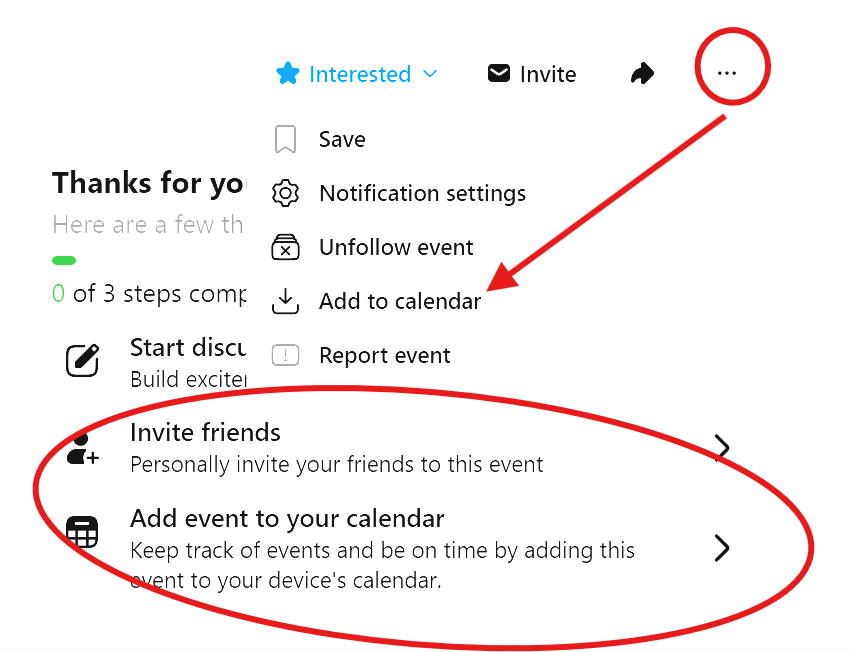
Add Your Event to Your Calendar (THIS IS THE MAGIC STEP)
This is what makes everything else automatic.
On your Facebook event:
- Click “Add to calendar”
- Choose the Google / Apple Calendar that you shared with Tucson Local Bands
Facebook will guide you through it—it’s quick and easy.
And that’s it! Your gig has been:
- Shared to all of your fans on Facebook
- Added to your calendar
- Automatically synced to the official Tucson Local Bands calendar!
Next up: a few more ways we can feature your band
- weekly roundups,
- newsletters,
- social media spotlights,
- and other Tucson Local Bands promotions.